
Appearance
Approval inbox
Requests waiting for a signature: leave, overtime, expense claims, business trips, attendance corrections — whatever your workspace has templates for. This is the page with the red badge on the rail.
Menu path Approve › Approval inbox
Address https://hub.cnvconnect.com/approvals
Permission approvals:view
Who uses it managers, approvers, everyone who submits requests
The screen
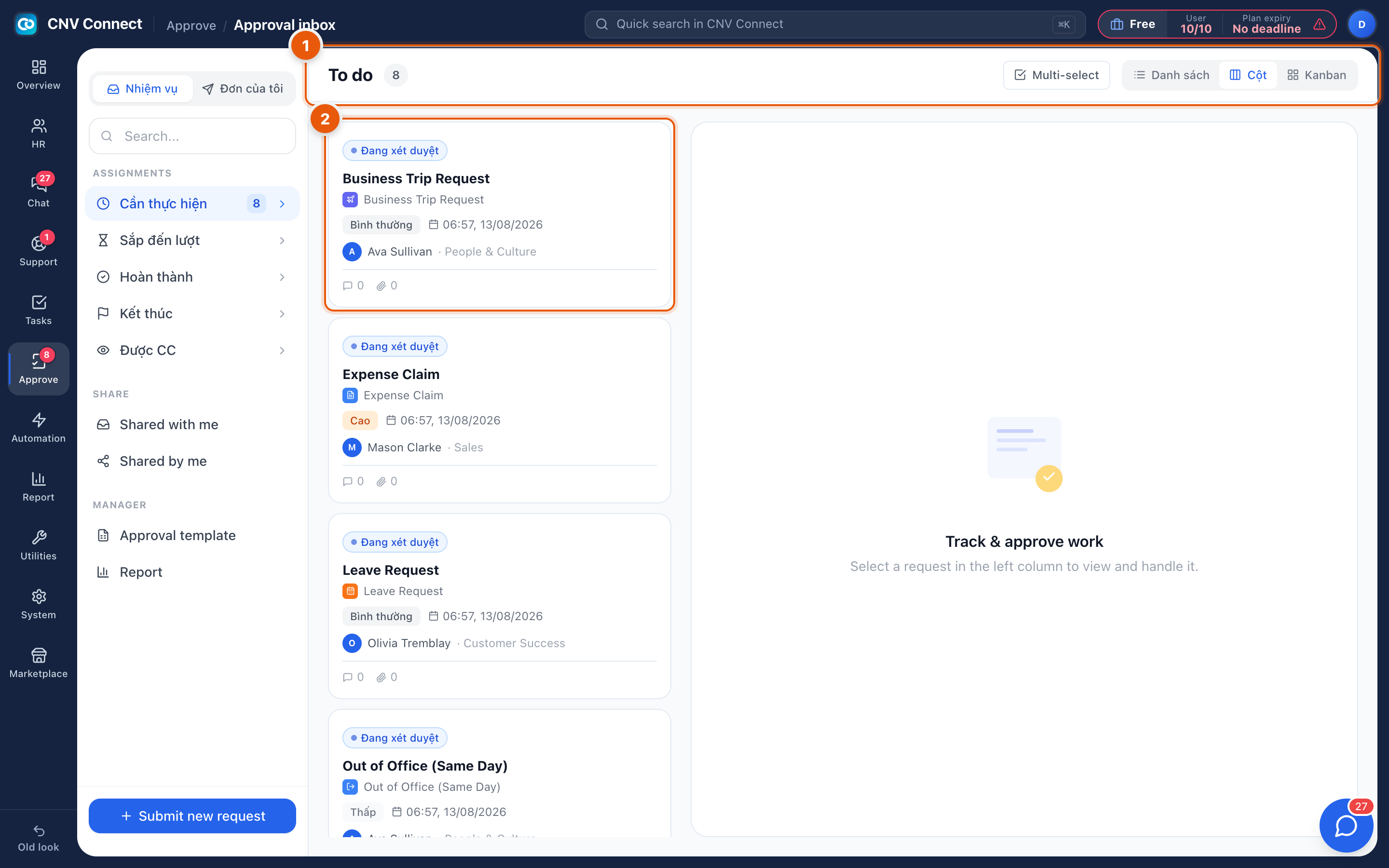
- Queue header and view switcher — To do with the number of requests waiting for you, Multi-select for deciding several at once, and the three layouts: list, columns (shown) and kanban.
- A request card — the status badge (under review), the template it came from, the priority, when it was submitted, who submitted it and their department, plus counts of comments and attachments. Select the card to open the request on the right.
The sidebar on the left is the rest of the module:
| Group | Item | What it holds |
|---|---|---|
| Tabs | Tasks / My requests | Requests for me to act on / requests I sent |
| Assignments | To do | Waiting for my decision — the badge number |
| Coming up | Coming to me after somebody else signs | |
| Completed | Approved and finished | |
| Closed | Closed, including rejected and cancelled | |
| Copied to me | Requests I was copied on | |
| Share | Shared with me / Shared by me | Lists other people shared |
| Manager | Approval template · Report | Administration |
Submit new request at the bottom starts a request from any template you are allowed to use.
How to…
Clear your queue
- Open the To do list.
- Select the first card and read it on the right.
- Approve or reject — see Reviewing a request.
- For a batch of identical, low-risk requests, use Multi-select.
Submit something yourself
Select Submit new request, pick the template (leave, overtime, expense claim…), fill in the form and send. Track it under My requests.
Find a request from weeks ago
Use the search box in the sidebar, or the approval statistics page, which lists every request with its code.
Notes
- The badge on the rail counts only the To do list — requests where the next signature is yours.
- Who a request goes to is decided by its template, usually via the submitter's department manager. A request that goes to the wrong person is a template problem, not a routing accident.
- Parts of this module have not been translated yet, so a few labels in the screenshot are still shown in Vietnamese. They sit in the positions described above.