
Appearance
HR events
A calendar of the people milestones a manager should not miss: birthdays, work anniversaries, probation ends and contract dates.
Menu path HR › Events
Address https://hub.cnvconnect.com/employees/events
Permission employees_events:view
Who uses it HR, office managers
The screen
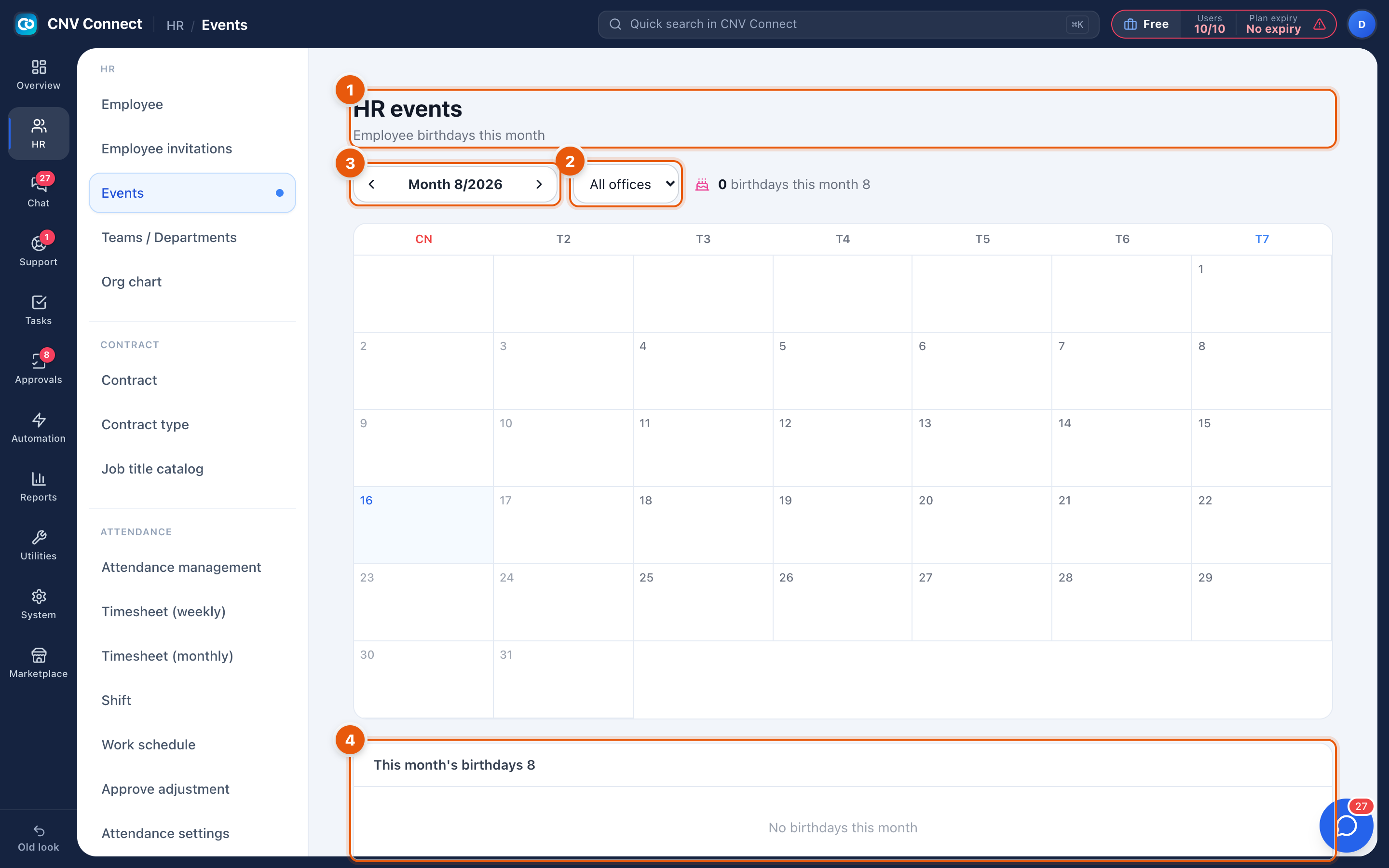
- Page title — HR events, with this month's birthdays.
- Office filter — narrow the calendar to one office when the company works across several sites.
- Month — the month being shown; the arrows beside it step backwards and forwards.
- This month's birthdays — the shortlist beside the calendar, with a count in the heading. When nobody has a birthday this month the panel says so.
How to…
See what is coming up
Open the page and read the current month; step forward a month to prepare for the next one.
Fix a missing birthday
Events are generated from employee records. If a birthday is missing, the date of birth is empty on that person's record — open Employees, edit the record and save. The calendar picks it up straight away.
Notes
- Events are read-only here; there is nothing to create on this page.
- Anniversary and probation events use the start date on the employee record, so a wrong start date shows up here first.
- The page does not send reminders. If you want a message in chat or an e-mail, build an automation flow for it.