
Appearance
Contract types
The catalogue of agreements your company issues — one-year fixed term, probation, part-time, and so on. Each type carries the employment status it grants and, optionally, the document template used to print it.
Menu path HR › Contract type
Address https://hub.cnvconnect.com/employees/contract-types
Permission employees_contract_types:view
Who uses it HR
The screen
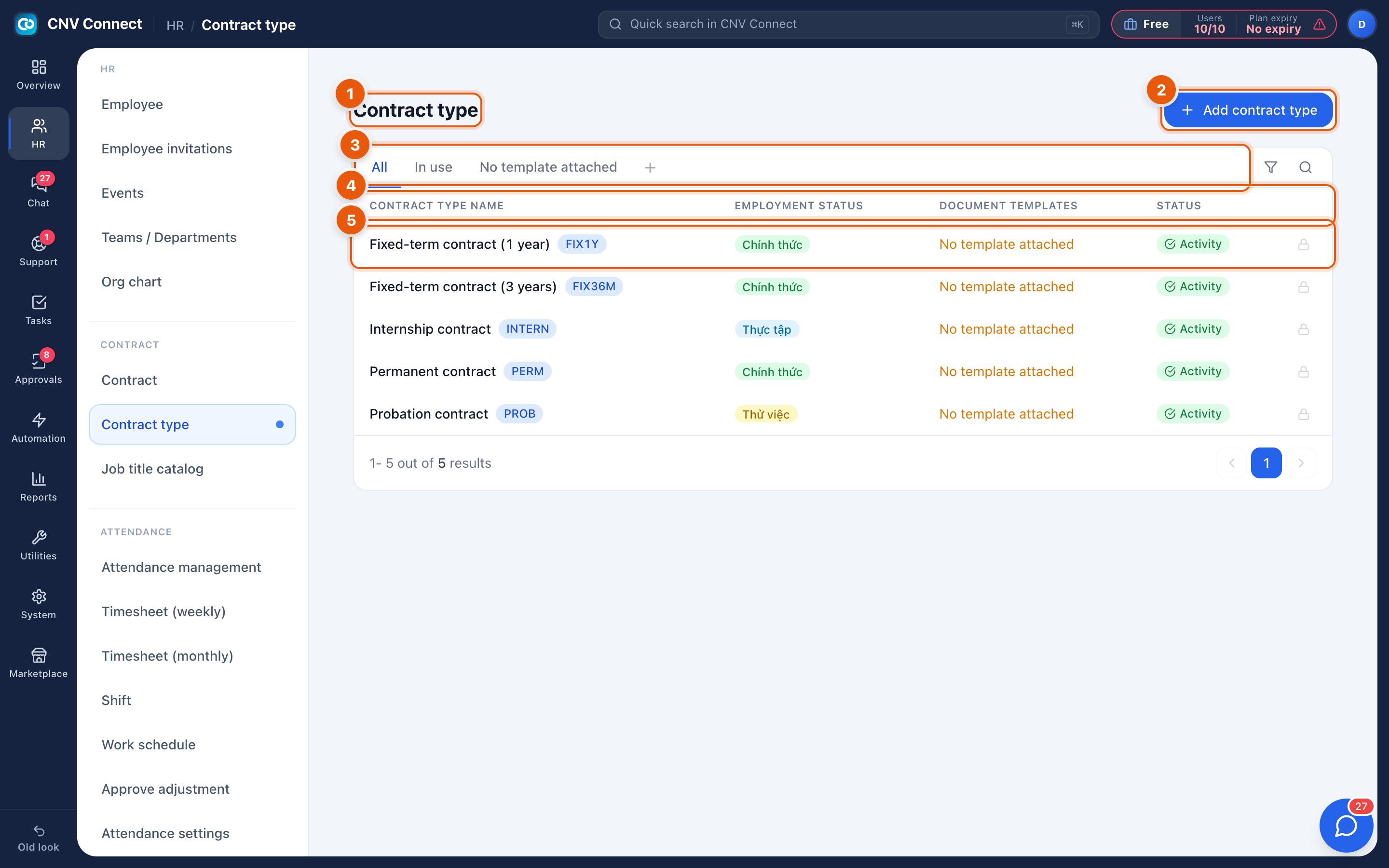
- Page title — contract type.
- Add contract type — create a new one.
- Filter tabs — All, In use (attached to at least one contract) and No template attached.
- Columns — contract type name with its short code, employment status (permanent, probation and so on), the linked document template, and status.
- A row — select it to edit the type.
How to…
Add a contract type
- Select Add contract type.
- Name it, give it a short code, and choose the employment status it grants.
- Optionally link a document template from the print library so contracts of this type can be generated rather than typed.
Retire a type you no longer issue
Set its status to inactive instead of deleting it. Existing contracts keep pointing at it, and it disappears from the picker when new contracts are created.
Notes
- Employment status is what other modules read — leave entitlement rules and payroll look at it, not at the contract name.
- A type with no template attached still works; you simply cannot generate the paper from the system.
- Codes appear in exports, so choose short, stable ones.