
Appearance
Pipeline library
A pipeline is a named sequence of stages that other modules reuse — for example the stages a support ticket moves through. Design them once here, then point a process at them.
Menu path Utilities › Pipeline library
Address https://hub.cnvconnect.com/settings/pipelines
Permission recruitment_pipelines:view
Who uses it process owners, administrators
The screen
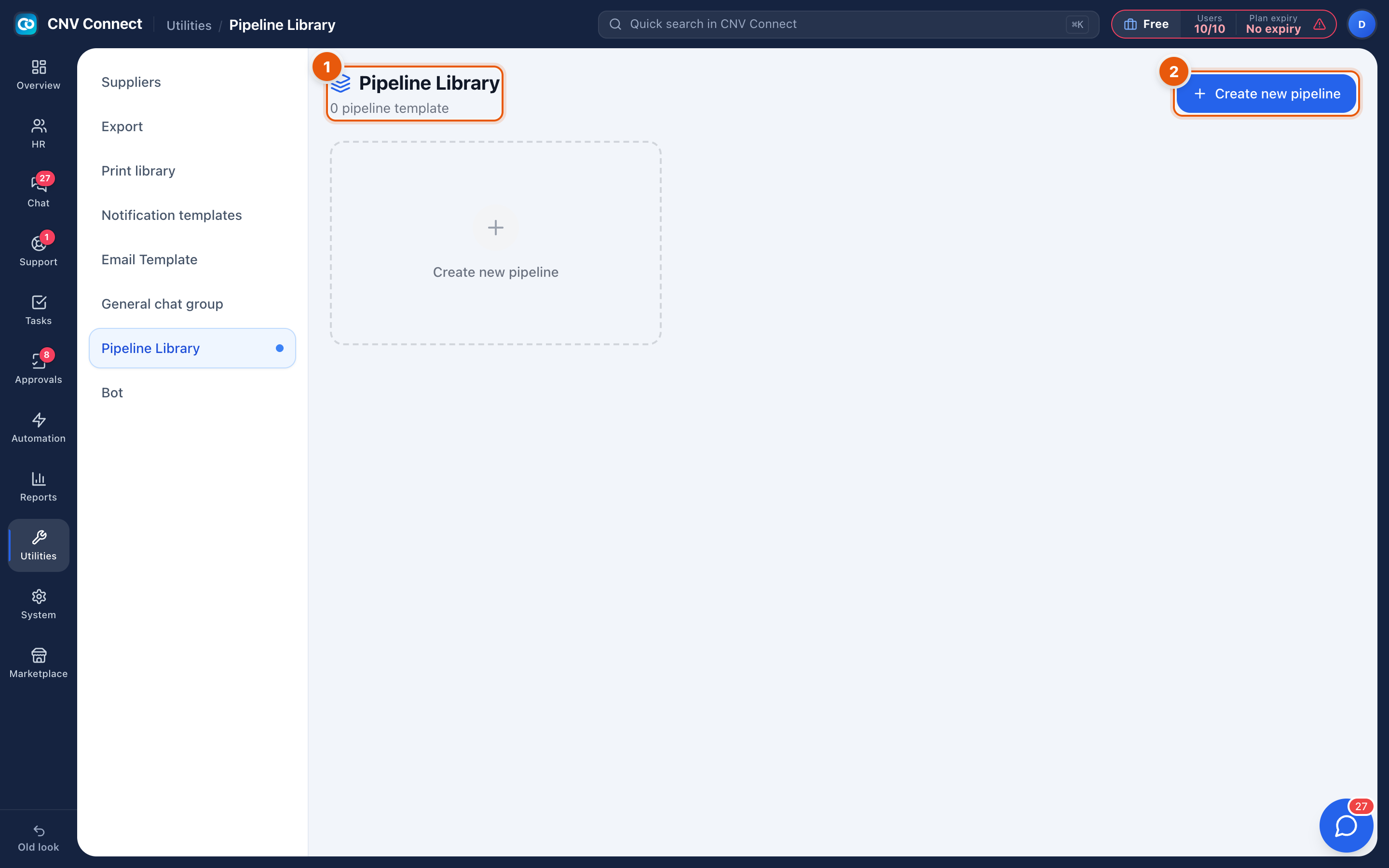
- Page title — the pipeline library, with how many templates exist.
- Create new pipeline — starts the builder.
The builder
Give the pipeline a name, then add the stages in order. For each stage you set its name, and whether it counts as an end state (won, lost, done). Save when the sequence reads like the process people actually follow.
How to…
Design a pipeline that survives contact with reality
- Write the stages somebody would name out loud — New, Investigating, Waiting on customer, Resolved.
- Keep it under about seven stages; more than that and people stop moving items honestly.
- Mark the terminal stages so reporting can tell open work from finished work.
Change one that is in use
Renaming is safe. Removing a stage asks where the items in it should go, so nothing is stranded.
Notes
- Pipelines are shared plumbing. Changing one affects every process pointing at it, so check before editing a pipeline you did not create.
- Task stages are not configured here — those belong to each task list (Stage settings).