
Appearance
Tickets
The help desk queue. Every request from a customer or a colleague becomes a ticket with a code, an owner, a priority and an SLA clock.
Menu path Support › Ticket
Address https://hub.cnvconnect.com/tickets
Permission support_tickets:view
Who uses it support agents, team leads
The screen
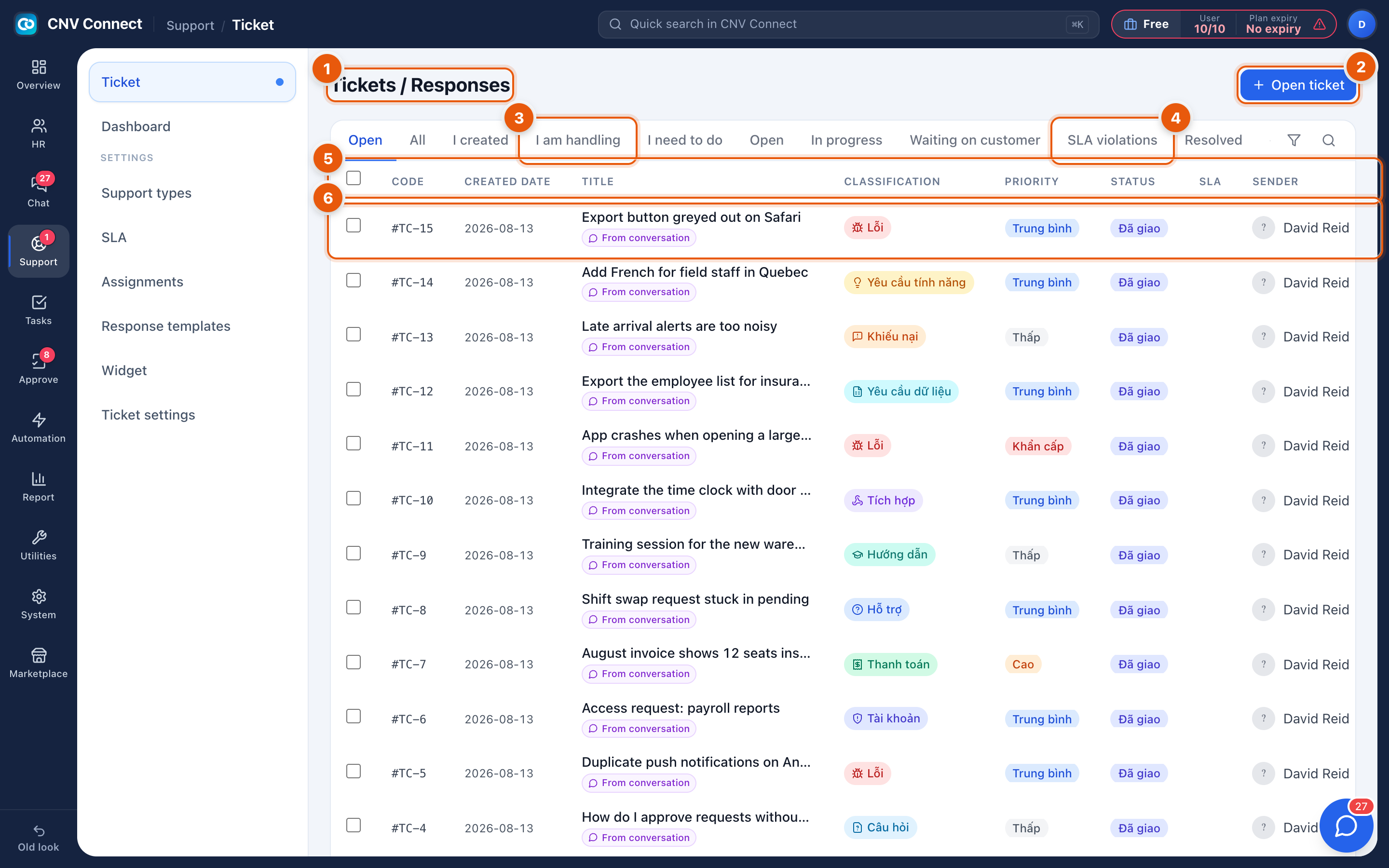
- Page title — the queue, with the number of tickets matching the filters.
- Open ticket — raise a ticket yourself, for example after a phone call.
- Scope tabs — All, I created, I am handling, I need to do. This is the difference between "everything" and "my work".
- Status filters — Open, In progress, Waiting on customer, SLA violations, Resolved. SLA violations is the one to watch.
- Columns — code, created date, title, classification, priority, status, SLA countdown, sender and handler.
- A row — select the title to open the ticket. Accept on the row takes ownership without opening it.
Some values are not translated yet
Classification, priority and status values in the queue still appear in Vietnamese — for example bug, medium, high, low, assigned and open.
How to…
Work your queue
- Select I need to do.
- Sort by SLA so the tickets closest to breaching are at the top.
- Open the first one and reply — see Working a ticket.
Raise a ticket for somebody
Select Open ticket, choose the requester, write the title and description, set the category and priority. The assignment rules pick the handler if you do not.
Find a ticket again
Use the ticket code (#TC-15) in quick search (⌘K), or filter the queue by sender.
Notes
- The SLA countdown comes from the SLA policy attached to the ticket's priority. No policy, no countdown.
- Priority drives the SLA, not the order of the list — sort the list yourself.
- Tickets can be created from chat, from the help widget on your website, and by e-mail, so a ticket without an obvious sender is usually a widget submission.