
Appearance
Overview dashboard
The first screen after signing in answers one question: what is happening in the company today? Everything on it is scoped to a single date and refreshes as people clock in.
Menu path Overview
Address https://hub.cnvconnect.com/dashboard
Permission dashboard_overview:view
Who uses it managers, HR, anyone who wants the daily picture
The screen
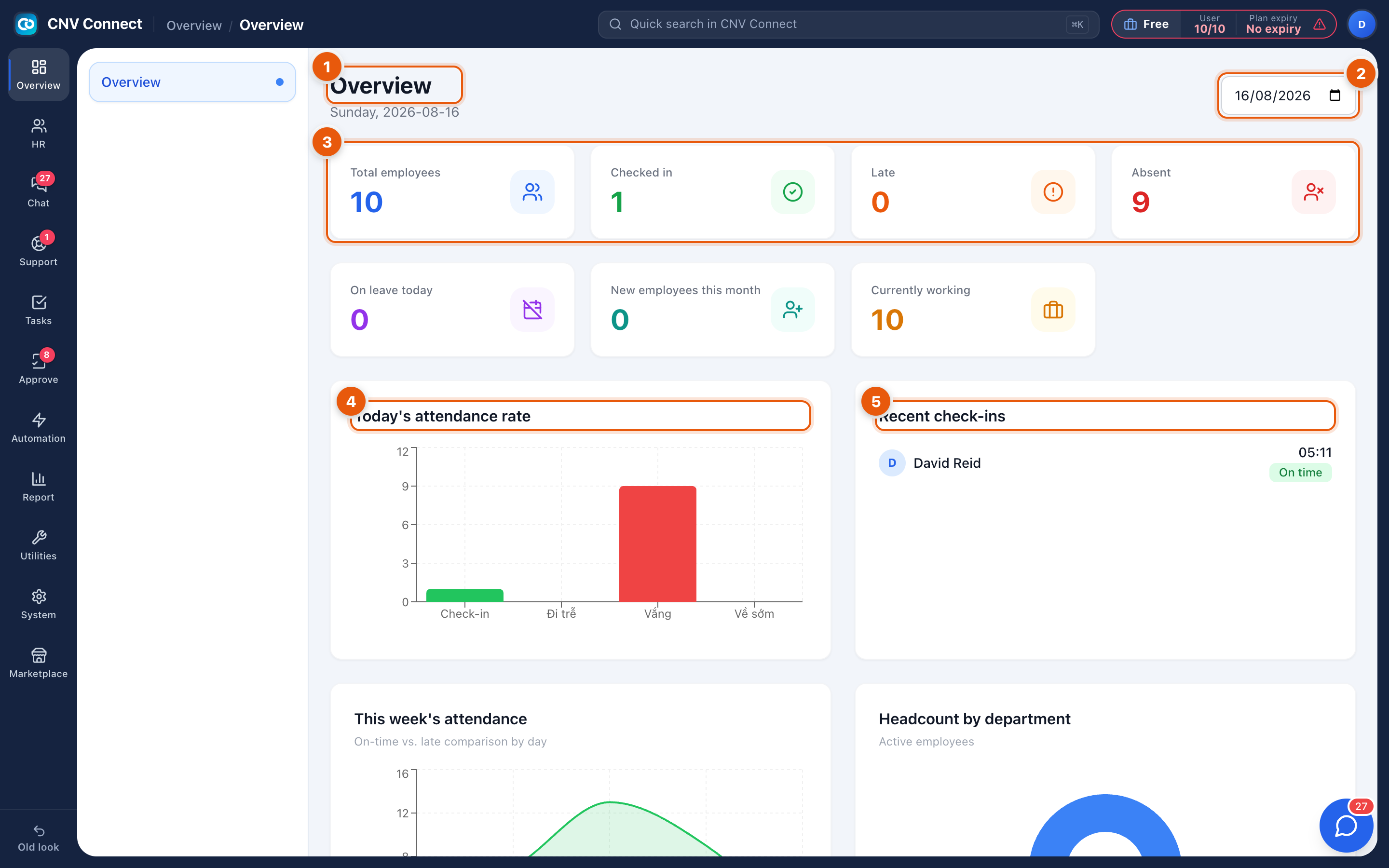
- Title and date — the long date under Overview is the day every number below refers to.
- Date picker — pick any other day to see how it looked. Useful the morning after, when somebody claims they were in.
- Summary tiles — the headline counts:
- Total employees — active employee records
- Checked in — people who have clocked in today
- Late — clocked in after their shift start, according to the attendance rules
- Absent — expected on shift, nothing recorded
- On leave today — approved leave covering this date
- New employees this month — records created since the 1st
- Currently working — clocked in and not yet clocked out
- Today's attendance rate — the same numbers as a bar chart: check-in, late, absent and left-early.
- Recent check-ins — a live feed of the latest clock-ins with the time and whether the person was on time.
Below the fold there are two more panels:
- This week's attendance — on-time versus late by day, so you can see whether Monday is a systematic problem.
- Headcount by department — active employees per team, taken from Teams / Departments.
How to…
Check who is missing right now
- Leave the date on today.
- Read Absent and Currently working together — absent people are expected but not present.
- For names rather than counts, open Attendance records and filter the status to Absent.
Review yesterday
- Select the date picker and choose the day.
- The tiles, both charts and the feed all move to that date.
Notes
- The tiles count employee records, not user accounts. Someone with a record but no app account still appears in Total employees.
- Late and Absent depend on the shift somebody was scheduled for. If nobody is on the work schedule, the workspace cannot tell late from early and the tiles stay at zero.
- Charts read from the same data as Reports; if a number looks wrong, the report will tell you which record caused it.
- The axis labels on the attendance chart are not translated yet and still appear in Vietnamese: they read, left to right, check-in, late, absent and left early.