
Appearance
Field form templates
The forms crews fill in on site: toolbox talks, equipment inspections, fit-for-duty and PPE checks, hazard assessments. A template is designed here; whether it is required before a shift starts is decided in Attendance settings.
Menu path HR › Field forms › Form templates
Address https://hub.cnvconnect.com/attendance/forms
Permission attendance_list:view
Who uses it safety officers, operations administrators
The screen
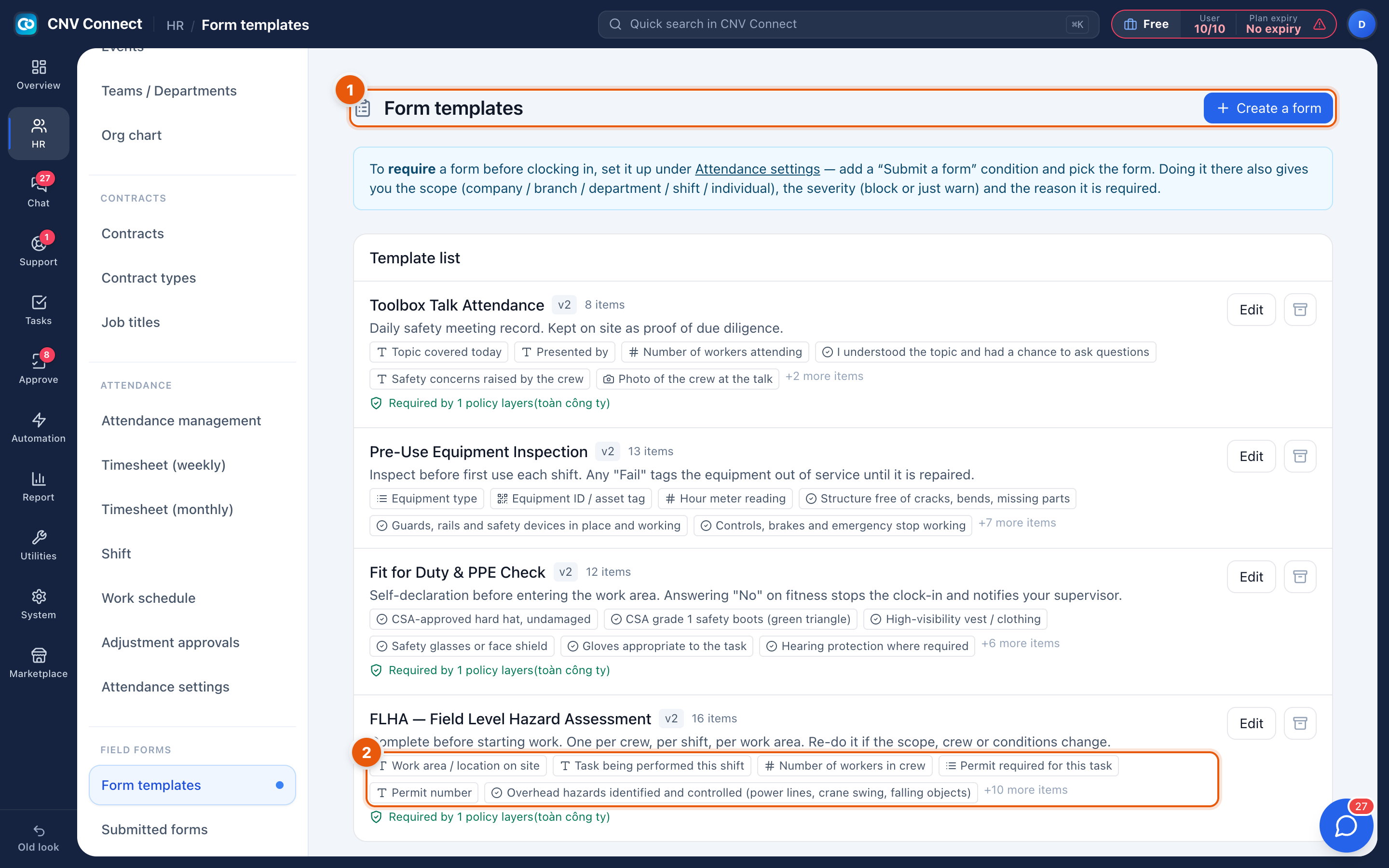
- Page title and Create a form — the catalogue of templates, and the button that starts a new one. This page is only about designing forms; the banner underneath links to Attendance settings, where a form is made compulsory.
- A template's questions — each chip is one question. The icon shows the answer type: T free text, # number, ☑ yes/no, ☰ choice from a list, 📷 photo. +N more items hides the rest.
How to…
Build a form
- Select Create a form.
- Name it and write a one-line description — crews read that line on their phone.
- Add questions, choosing the answer type for each: text, number, yes/no, single choice or photo.
- Mark the questions that must be answered.
- Save. The template is available immediately, but nobody is asked for it yet.
Require it before clock-in
Open Attendance settings, add a layer with a submit a form condition, pick this form, choose the scope (company, branch, department, shift or one person) and choose block or remind. The banner at the top of this page links straight there.
Change a form that is already in use
Editing a template creates a new version (v2, v3…). Submissions keep the version they were filled in with, so an audit of last month still shows the questions that were actually asked.
Retire a form
Archive it. It disappears from the phones but its history stays in Submitted forms.
Notes
- Answers of type yes/no can be made blocking: for example, answering No on fit for duty stops the clock-in and notifies the supervisor.
- Photo questions consume storage; a daily photo per crew adds up.
- Forms are filled in on the mobile app; the web workspace only designs them and reads the results.