
Appearance
Template builder
Where a request type is designed: its identity, its form, its approval chain and its settings. Four numbered steps across the top, saved as a draft as you go.
Menu path Approve › Approval template → select a template
Address https://hub.cnvconnect.com/approvals/templates/<id>
Permission approval_templates:view
Who uses it HR and administrators
The screen
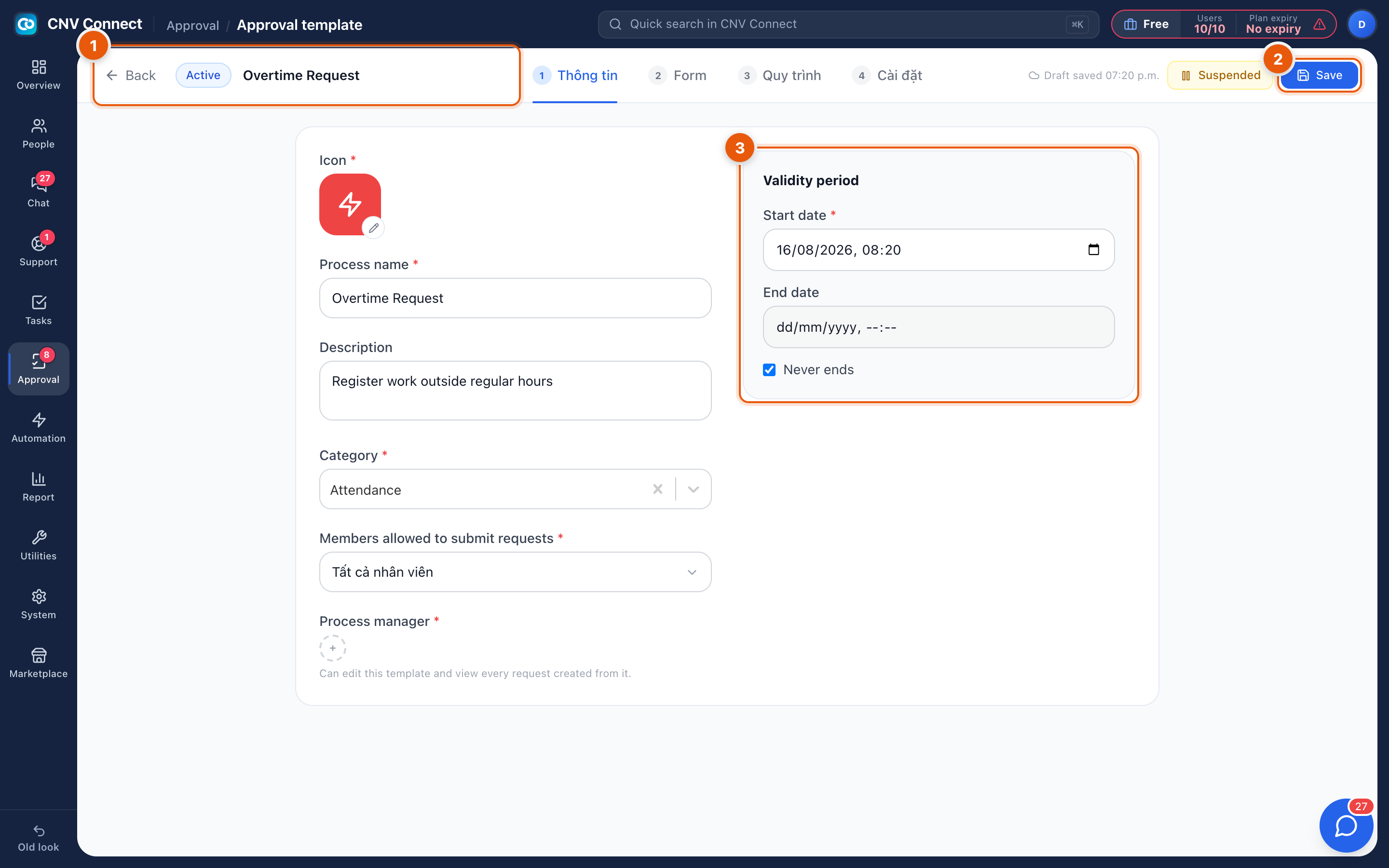
- Header and steps — Back to the list, the state (Active), the process name, and the four numbered steps: information, form, process and settings. Suspended takes the template out of circulation.
- Save — writes the change. The Draft saved note beside it is an autosave of your editing session, not a published change.
- Validity period — when the template may be used: a start date, and either an end date or Never ends.
Step 1 — Information
| Field | What it is for |
|---|---|
| Icon | How the template is recognised in the submit dialog and the inbox |
| Process name | What people will look for — "Overtime Request" |
| Description | One line explaining when to use it |
| Category | Groups templates: attendance, HR, finance… |
| Members allowed to submit requests | Who may raise this request — by default, all employees |
| Process manager | Who may edit the template and see every request made from it |
Step 2 — Form
The fields the submitter fills in: text, numbers, dates, choices, file uploads. Mark the ones that are mandatory. Keep it to what the approver actually needs to decide — every extra field is friction on the phone.
Step 3 — Process
The approval chain: who signs, in what order, and what happens in parallel. Steps can point at a named person, a role, or a relationship such as the submitter's department manager, which is what makes one template work for the whole company.
Step 4 — Settings
Notifications, whether requesters may cancel, and how the finished request is filed.
How to…
Add a second approver above a threshold
Build the chain in step 3 with a condition on a form field — for example, expense claims above a limit gain a finance step. Conditions read the fields defined in step 2, so design the form first.
Test before you publish
Save, submit one request yourself, and watch where it lands. A chain that points at an empty role is the usual cause of requests that sit forever.
Notes
- Requests in flight keep the version of the template they started with.
- Never ends is the normal choice; the end date is for temporary processes such as a one-off survey.
- Three of the four step labels have not been translated yet and still read in Vietnamese in the screenshot; they are in the order given above.